



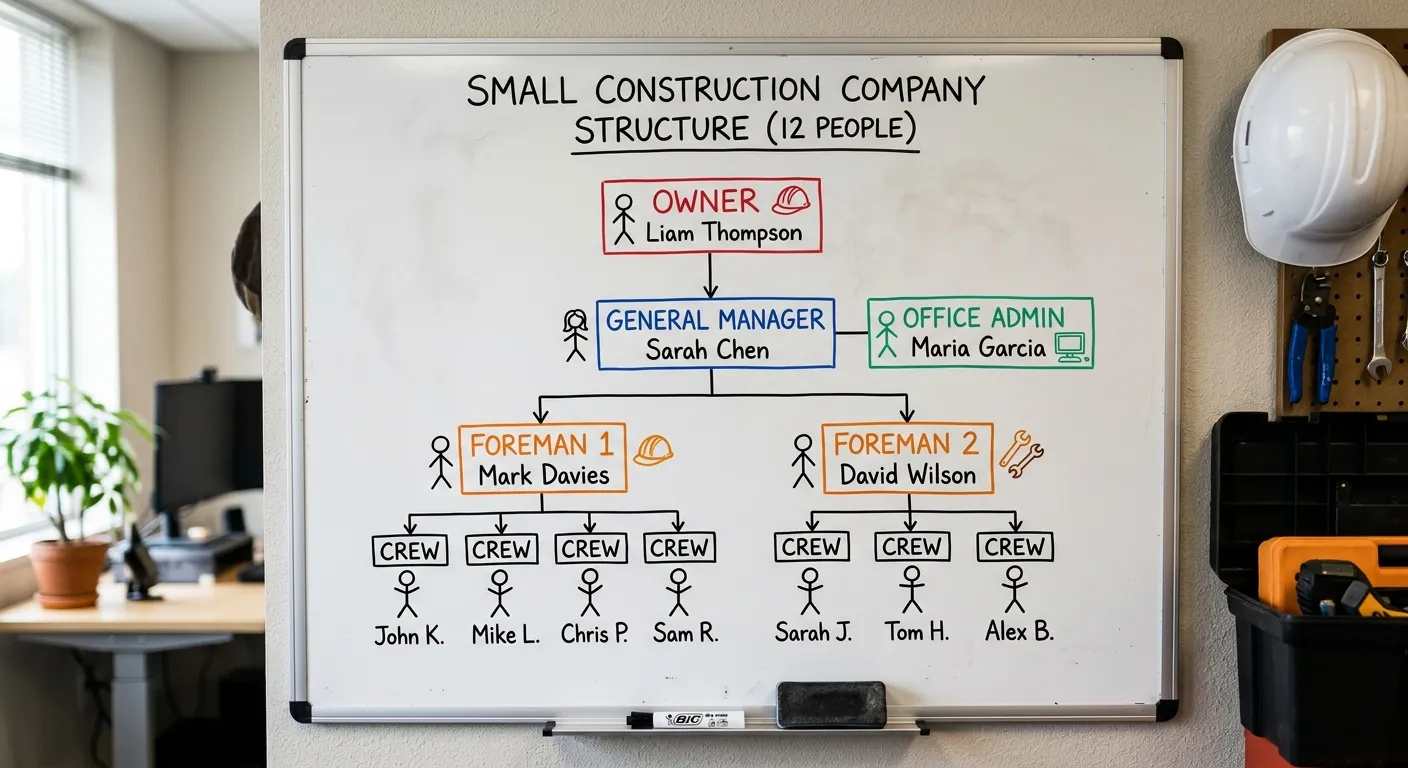
A twelve-person outfit we work with runs about $1,453 a month. That’s the owner, his office manager, the admin who handles books and scheduling, two foremen who take laptops out to the job, and seven guys in the field who never open a computer at all. Everybody in that company has a protected email seat, five of them have a support plan, and the office network is covered. There was a one-time onboarding cost on top of that, and I’ll get to it.
I’d rather show you how that’s built than hand you an industry average, because an average is going to be wrong for you. What IT costs a construction company depends almost entirely on how many of your people actually touch a computer, and that ratio is different in construction than it is in about any other business.
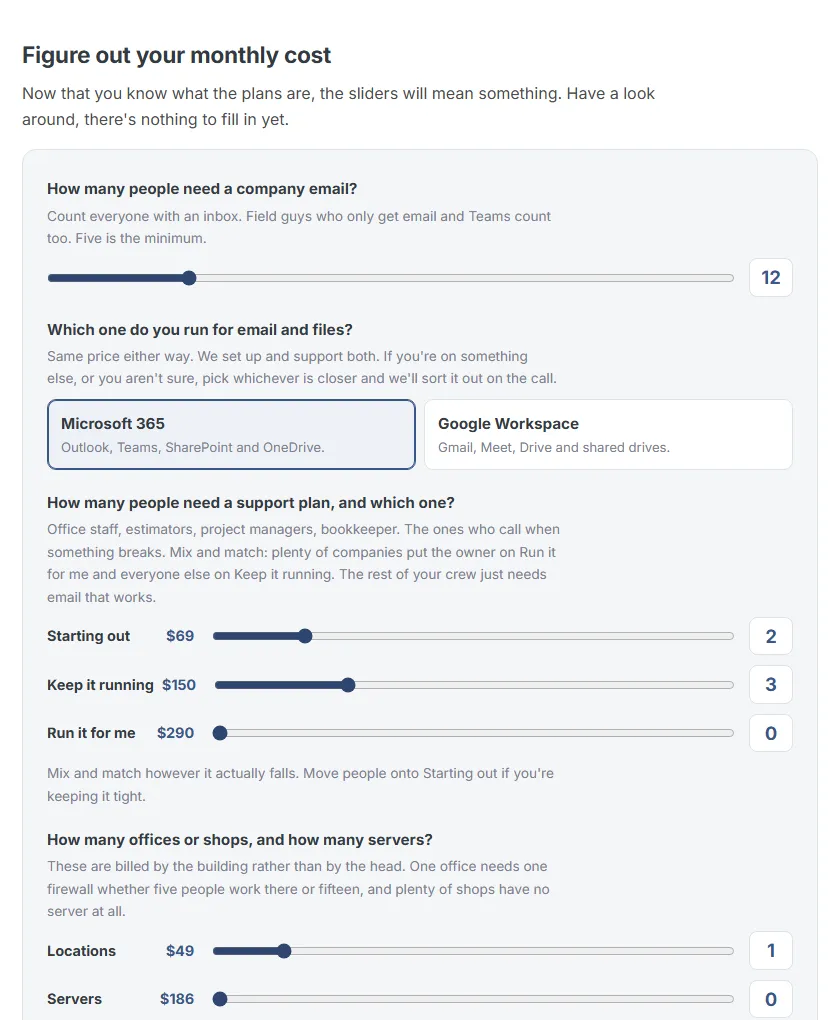
Want the number without reading the rest?
The calculator on the pricing page does this same math for your crew. Move three sliders and you have a close estimate in about thirty seconds.
Open the calculatorThe arithmetic on that $1,453
| What it is | Count | Rate | Monthly |
|---|---|---|---|
| Cloud Pack seat, everybody with an inbox | 12 | $68 | $816 |
| Keep it running, the three in the office | 3 | $150 | $450 |
| Starting out, the two foremen with laptops | 2 | $69 | $138 |
| Office network, billed by the building | 1 | $49 | $49 |
| What they pay | $1,453 |
Seven of those twelve never get a support plan at all. That’s on purpose, and it’s the single biggest reason the number lands where it does.
What you’re actually buying for $68 a person
That $68 line is the one people assume is just email. It’s the whole working setup for one person, and about half of it is the part you never see until the day you need it.
Their mailbox and calendar, and the office programs they write, figure and plan in.
A terabyte of company file storage behind it, so the work lives somewhere that gets backed up instead of on a laptop that rides around in a truck.
Spam and phishing filtering in front of every inbox. In construction that is the line between catching a fake invoice and paying one.
Antivirus on the machine, monitoring so we see it going bad, and the critical patches applied without anybody having to remember.
Their desktop and documents folders copied up to the cloud, so a stolen laptop is a bad afternoon instead of a lost month.
Email archiving, so the chain on a job from three years ago is still findable when somebody disputes what was agreed.
A password manager for every person, which I'd put ahead of nearly anything else you could spend the money on.
Phone support during business hours, where you get a person.
The seat is also what makes support possible. We can only help someone who has one. That’s why it goes on everybody with an inbox, and why the support plans are a separate decision on top.
Two purchases, kept apart on purpose
Your bill has two halves and we split them out so you can see what each one costs.
The first is software. The licences, the security around them, the monitoring on the machine. Of that $1,453, software is $816 of it, and it costs the same whether that person ever calls us or not.
The second is the support plan, and that one buys our time. You buy it one person at a time, because the guy framing the same house for the next five weeks isn’t going to call and shouldn’t be paying as though he might.
So when the bill feels heavy, most of what you’re carrying is the software protecting your business.
Support we count by person or by computer, whichever is fewer, so eight guys sharing six machines is six. Five on the cloud side to start, and two of those sit on Keep it running or Run it for me.
The three plans, and what the money actually buys
You’ll see two names on each of these. I use the plain one when we’re talking, and the formal one is what shows up on the agreement you sign and on your invoice, so you can match this to your bill.
Starting out
Business Secure
$69
per person, per month
- Every device secured, patched and watched
- Call us about any of it, as often as you like
- Work we do for you is $129 an hour in fifteen minute blocks, so a ten minute fix is $32.25, not an hour
Keep it running
Business Support and Secure
$150
per person, per month
- Everything in Starting out
- All the remote work included at no charge, and nobody counting your tickets
- Remediations, backup and your technology roadmap included
Run it for me
Pro Business Support and Secure
$290
per person, per month
- Everything in Keep it running
- The onsite visits for that person included too
- The one you pick when you never want to see an extra bill
The reason I put the owner and whoever runs the office on Keep it running is that I want them calling early. The thing nobody called about at nine in the morning is usually the thing we’re fixing at four.
Remote work and one of us driving out to your office are two different things on the first two plans. Onsite is $129 an hour on both of them, and only Run it for me includes the drive.
Not every employee needs a seat
This is where a lot of IT pricing quietly stops fitting construction.
If a guy is pushing a broom all day, he has nothing to do with your systems, and you shouldn’t have to pay to protect him. Same goes for most of your field crew. They get a text telling them which job to show up to, or they already know they’re framing the same house through the end of the month. No email, no files, no seat.
The test I use is about as simple as it gets. Is this person connected to your office, and is he getting or working in files of any kind? If he is, he needs to be protected and supported, and so does whatever he’s working on, even if that turns out to be an iPad in a truck. If he isn’t, save your money there.
A law office needs every single person locked down. A framing crew doesn’t, and you shouldn’t have to pay like you’re one.
What about mobile devices?
If you’re running seven to fifteen people you’re probably not handing out company phones yet, and your foreman doesn’t want to carry two of them. He’d rather you text his own. That does put company data on a personal phone, so what we work out is how to protect his email without taking over the device. I’m not going to put security software on a man’s personal phone.
What gets billed by the building instead of by the head
A few things don’t scale with people at all, and so they’re priced the way they behave.
One office needs one firewall whether five people work in it or fifteen. The location runs $49 to $149 a month depending on what’s in it. A server runs $186 a month, and plenty of shops don’t have one anymore. Backup is priced by the gig, because that’s how the storage is priced to us.
Devices beyond somebody’s main one are $15 a month each. Every machine we protect needs its own licence, and we have to buy that licence whether it’s your foreman’s second laptop or the tablet living in the shop. So the $15 is that cost passed straight through. It’s also why the count matters. A machine living in a truck that nobody thinks about is still one somebody has to secure.
Onboarding
Onboarding is $1,000 to $3,000+, one time.
That covers us taking over what you already have. Some of what that looks like:
Getting into the Microsoft 365 or Google Workspace you already run.
Moving the licensing onto one bill.
Putting monitoring, security and backup onto every computer.
Setting your people up in the password manager.
Writing down what you actually own, so there's a record of it instead of somebody's memory.
Every company comes to us in a different state, so the real list is longer on some jobs and shorter on others. Where you land in the range depends on how many machines we touch and what shape things are in when we get there. We quote it before we start rather than after.
The term is three months to start so onboarding has time to settle, then it’s month to month with thirty days notice. If it ever stops being a good fit, you’re free to move on.
Why that number is hard to say yes to
The two conversations I remember best both ended with a no.
His IT guy had disappeared on him, and he had six to eight people who needed support. What I remember is the brand new computers sitting on the desks next to the old ones, gathering dust, because nobody had ever rolled them out. He'd already spent that money and never got the use of it. Affording it was never really the question for him. He didn't see what any of that technology would do to actually help his bottom line. His workers were still getting it done.
He was buying up businesses, and every one he added came with its own systems and its own needs stacked on top of the last. He knew he needed somebody handling it. The budget wasn't there yet, and that is a fair answer. It may well be there next year.
One didn’t have a line in the budget for it yet. And the other had the money and didn’t see what he’d get for it.
Construction makes this harder than most industries, and I don’t think that gets said enough. It’s a hunt kill business. There’s no recurring revenue, and you might get more work out of a good client but you don’t know when it’s coming, and it’s feast or famine a lot more often than it’s steady. Quiet through the winter, buried through the summer, and not always ready for the swing. So committing to a fixed monthly number takes more nerve for you than it would for somebody with contracts renewing every month. I get that.
What the other option costs
The comparison I keep coming back to is hiring somebody.
Bring an IT person in-house and you’re paying salary plus payroll taxes, benefits, training, and every tool he needs to do the work. That lands well over a hundred thousand a year. And one person still can’t cover it all, because nobody is good at networking and security and phone systems and your job software all at once.
At $1,453 a month you’re at about $17,400 a year. That’s a long way from a salary, and you get a bench behind it instead of one person.
The bench is on purpose, and it’s the reason I say we rather than me through most of this. I set this company up to be the general contractor of the IT world, and I don’t pretend to do all of it myself. I work with people who build websites, people with real design training, other MSPs up in Portland when a job needs two teams, and engineers I can pull in for networks bigger than what I usually handle. Same as you’d sub out concrete instead of buying a pump truck. You still get me on the phone. You just don’t get only me.
What we usually find when we open the closet
Almost every construction office I walk into has two or three computers still running that nobody wants to be the one to turn off. Usually a server or two as well, with no clear answer about what’s still living on them, and a couple of routers where nobody can tell me which one connects to what. That’s because one vendor installed his and the next vendor installed hers and nobody ever took anything out.
Just taking a proper inventory tends to save money before we’ve changed a single thing. Companies double pay for services all the time, or they’re paying for something a tool they already own does better. The other one I run into a lot is three separate Microsoft tenants that don’t talk to each other, so people can’t reach each other properly in Teams and the email gets messy. All fixable. It just never got set up right.
Then there’s the cheap computer problem. Contractors buy the cheap laptop to save money and end up replacing it every two or three years. One decent machine costs less over the same stretch, and it doesn’t die in the middle of a bid.
If you’re not ready for that yet
Plenty of the contractors I talk to aren’t ready to put a monthly number in the budget, and they still want help. There’s real work you can do first, and all of it puts you in better shape whether you ever call us or not. Three things, in the order I’d do them.
-
Get a password manager. I’d put it ahead of antivirus and ahead of just about anything else on the machine. I’ve written about why that order surprises people.
-
Get the right software for whatever you do the most of. Look at what you’re actually doing at seven at night. Rebuilding the same estimate for the fourth time? Chasing a change order that only ever lived in a text message? I’d start with something like Jobber, and Knowify is a nicer fit once there’s a little more room in the budget. Being able to put an estimate together quickly will buy back more of your evening than anything else here.
-
Don’t be afraid to buy a laptop that’s actually going to work.
And if you’re still on QuickBooks Desktop, start planning the move to QuickBooks Online, because a lot of the useful tools assume you’re already there.
One note on AI, since everybody asks. It can genuinely help with this work, but it needs a system underneath it first. Without a good foundation, you’re throwing things at a wall and getting them back slightly better, which isn’t much. Get the system in place, then let AI speed it up.
Do those three and you’re a lot closer to ready. It makes onboarding easier too, because most of the cleanup is already done.
Prices in this article are current to September 2026. If you’re reading it later, the shape will still be right and the numbers may have moved. The pricing page has the current ones and a calculator that does the math for your crew.
There’s a lot here as food for thought. If you want to sit down for thirty minutes or so and talk through what your company needs, and whether we’re a good fit, let’s have that conversation. I’m based in Albany and happy to drive out to your office, or meet at a good brewery.
Andrew Allen
Owner & Founder, Taggerung Solutions
Eight years in enterprise IT, seven-plus years in Oregon construction, including General Foreman at Dick Welker Construction. Holds an active Oregon CCB license (#252384). About Andrew →